Issue #117
Read about infrastructure and programming topics and news every week

In this issue, I talk about a very important topic for me: CI/CD pipelines, lousy dependency management tools (asdf-mise) and more importantly, YAML becoming a programming language for CI/CD, with bash code intermixed in YAML, impossible to test and develop locally, with the emergence of what I call: commit-driven-development. In order to test a coma, you have to commit to it and push it. This is not good, this is painful.
Dependency Management Is CI/CD’s Missing Primitive: from asdf and mise to Nix-driven pipelines
There’s a quiet category error that shows up in a lot of infrastructure work:
“Dependency management” gets treated as language dependencies (npm/pip/maven…).
Meanwhile, the toolchain + OS-level dependencies (Terraform, Node, Python, Docker, jq, protoc, compilers, libc quirks, CA certs, etc.) are managed ad hoc: random Homebrew installs, undocumented apt-get invocations, and—eventually—a lot of Bash embedded in YAML.
The result is familiar: “works on my machine” never really dies; CI pipelines become the only place the full environment exists; and the feedback loop turns into commit → push → wait → stare at logs → repeat.
This piece is about the tooling spectrum that sits underneath that mess: asdf, mise, Devbox, and Nix—and why the “local-first, reproducible pipeline” story becomes much more realistic once the environment is treated as a first-class artefact.
1) The dependency-management spectrum: tool versions, environments, and builds
Not all “dependency tools” solve the same problem. In practice, there are three overlapping layers:
Layer A: tool version managers (polyglot runtime/CLI pinning)
These focus on “this repo needs Node 20, Terraform 1.7, Python 3.11”.
asdf popularised the “one file per repo” pattern using
.tool-versions, with a plugin model per tool/runtime.
Source: https://asdf-vm.com/manage/versions.htmlmise (mise-en-place) positions itself as a polyglot tool version manager that replaces a stack of point solutions (asdf, nvm, pyenv, etc.).
Source:
https://mise.jdx.dev/
aqua is another take: declarative CLI version management with a registry and “lazy install” approach.
Source: https://github.com/aquaproj/aqua
These tools are very good at pinning versions of developer-facing CLIs and runtimes.
Layer B: dev environment managers (a consistent shell, per-project variables, runnable tasks)
This extends beyond “versions” into “the environment that runs the work”.
Mise explicitly includes env-var management and a task runner, aiming to replace tools like direnv and make, in addition to version management.
Source:
https://mise.jdx.dev/
Devbox creates an isolated environment from a
devbox.jsonand provides a shared shell where “everyone gets the same version of those tools.”
Sources:
Layer C: reproducible build systems (hermetic-ish builds, composable artefacts)
This is where the story shifts from “pin versions” to “define everything deterministically”.
Nix is a package manager and build system designed for reproducible, declarative systems.
Sources:https://nixos.org/
Nix isn’t just “install tool X”. It’s “define the whole world this code needs”.
2) Quick reality check: why Nix/Devbox get labeled “scary”
The “Nix is powerful but scary” meme exists for a reason: new concepts (the store, derivations, flakes), a different mental model, and a lot of surface area.
But two things changed the practical onboarding curve:
Wrapper tools like Devbox intentionally hide most Nix syntax behind JSON config (“no Dockerfiles or Nix required”), while still using Nix underneath.
Sources:Code agents now handle much of the boilerplate generation/iteration. OpenAI’s GPT-5.3-Codex is explicitly positioned as a Codex-native coding agent for long-horizon technical work.
Source: https://openai.com/index/introducing-gpt-5-3-codex/
The interesting consequence isn’t “AI writes your infra”. It’s that the cost of trying Nix/Devbox drops dramatically when a model can spit out a working flake.nix or devbox.json, refine it, and adapt it to your repo shape quickly.
3) Capability scorecard (1–5): asdf vs mise vs Devbox vs Nix (+ adjacent tools)
Interpretation of scores:
1 = weak/limited, 3 = decent, 5 = strong/best-in-class
For “Approachability”: 5 = easier to adopt (gentler curve)
Table A — Scorecard
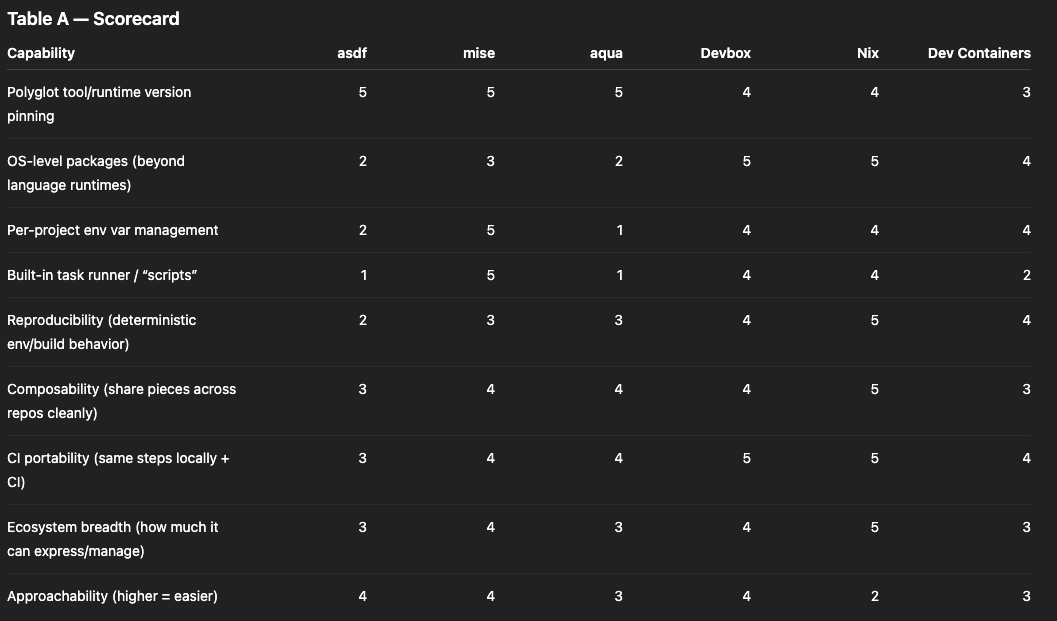
Why Nix wins on “breadth” and “reproducibility”: it’s the only option here that is simultaneously a package manager and a build system with a strong “reproducible/declarative” core.
Sources:
https://nixos.org/
Why Devbox scores high on “CI portability”: it’s explicitly designed to provide a consistent environment definition (devbox.json) that can be used by everyone on a team, and it includes a “scripts” mechanism to run the same commands inside that environment.
Sources:
Notes on Dev Containers: they’re a strong story for “consistent environment”, but they’re container-image-centric; the reproducibility depends on how deterministic the Dockerfile/build is and how images are pinned. The spec centres around a devcontainer.json describing a deterministic way to create the dev container.
Source: https://containers.dev/implementors/spec/
4) Reproducibility: what “works the same” actually means
“Reproducible” gets used loosely, so it’s helpful to separate levels:
Level 1: “same tool versions”
asdf/mise/aqua excel at this: pin versions of Terraform, Node, Python, etc. It eliminates a big source of drift.
Source: https://asdf-vm.com/manage/versions.html
But tool versions aren’t the full environment. Compilers, system libraries, and transitive OS dependencies still matter.
Level 2: “same environment”
Devbox is explicitly about “a consistent shell for everyone on the team” defined in devbox.json.
Sources:
It also supports repo-defined scripts (devbox run) so the environment and the commands are bundled together.
Source: https://www.jetify.com/docs/devbox/guides/scripts
Level 3: “same build graph”
Nix pushes further: it’s designed around declarative, reproducible builds and environments, using Nix expressions/derivations.
Sources:
https://nixos.org/
This is where you stop thinking “install dependencies” and start thinking “define outputs”. That mindset maps unusually well onto CI/CD.
5) CI/CD today: YAML as the place where logic goes to become untestable
Most modern CI systems are YAML-driven. That’s not inherently bad—YAML is a reasonable orchestration format.
The failure mode is when YAML becomes:
the programming language (logic inlined as Bash),
the dependency manager (install steps embedded everywhere),
and the only executable spec of how to build/test/release.
The compounding problem: indirection libraries (GitLab includes, CircleCI Orbs)
GitHub Actions workflows are YAML files in .github/workflows.
Source: https://docs.github.com/en/actions/reference/workflows-and-actions/workflow-syntax
GitLab CI pipelines are YAML, and GitLab explicitly supports composing pipelines by include-ing YAML from other files or repos.
Source: https://docs.gitlab.com/ci/yaml/includes/
CircleCI pipelines are YAML, and “Orbs” are reusable packages of configuration elements (jobs/commands/executors) that you import into config YAML.
Sources:
Local testing stories exist, but they’re still CI-shaped:
CircleCI CLI can run some jobs locally in Docker (with limitations).
Source: https://circleci.com/docs/guides/execution-managed/run-a-job-in-a-container/GitHub Actions can be run locally with
act(Docker-based).
Source: https://github.com/nektos/actGitLab has runners and tooling, but debugging pipelines assembled from multiple includes often becomes “follow the YAML graph across repos.”
Source: https://docs.gitlab.com/runner/
All of these are legitimate tools. The deeper point is that once pipelines are mostly YAML + embedded shell, local iteration tends to remain awkward—especially as the amount of shared YAML grows across repos.
6) Local-first CI/CD: treat the pipeline as code, and YAML as wiring
A different architecture flips the emphasis:
Put the real work (build, lint, test, package, publish) into locally runnable code.
Use CI YAML primarily for:
triggering,
fan-out/fan-in orchestration,
secrets/permissions,
and environment selection.
This is where Nix becomes more than “a dependency tool”. It becomes the packaging format for your pipeline.
Nix’s own framing is “reproducible, declarative and reliable systems.”
Source:
https://nixos.org/
So instead of writing “install X, run Y” in YAML, the pipeline can call pre-defined Nix outputs.
Nix also has an official guide on CI with GitHub Actions, emphasising reproducible builds and caching.
Source: https://nix.dev/guides/recipes/continuous-integration-github-actions.html
Common operational glue:
Determinate Systems’ GitHub Actions for installing/caching Nix and working with flakes.
Source: https://docs.determinate.systems/guides/github-actions/Cachix for binary caching of Nix build artefacts in CI.
Source: https://github.com/cachix/cachix-action
7) Concrete example in the wild: Mitchell Hashimoto using flakes for CI/dev test reproducibility
Mitchell Hashimoto has written about using Nix to keep environments aligned across dev and CI, framing it as a “single source of truth” problem.
Source: https://mitchellh.com/writing/nix-with-dockerfiles
For a very concrete “flake in CI” example: his libxev GitHub Actions workflow installs Nix and runs flake-based checks, explicitly aiming to keep environments consistent between local dev and CI runs.
Source (workflow YAML in repo):
https://raw.githubusercontent.com/mitchellh/libxev/e7d4e6dfd208b4d90715766f92aeaf0163e4bdd9/.github/workflows/test.yml
The core pattern is the point:
define checks and dev shells in a flake,
run them locally the same way,
have CI just call those same flake outputs.
8) What “CI/CD libraries” look like in a Nix-first workflow
Instead of writing complex YAML logic, the flake (or Nix module set) becomes the library boundary.
Typical building blocks:
devShells: the canonical dev environment used by humans and CI jobs
checks: standardised test/lint/build checks (often what
nix flake checkruns)packages/apps: build artifacts or runnable command entrypoints
Then CI calls:
nix flake checkfor a consistent “does the repo evaluate and pass checks?” gatenix develop -c <command>for anything that should run inside the pinned toolchainnix buildfor artifacts
YAML remains as orchestration and policy, not as an untestable programming substrate.
9) YAML’s best role: permissions, policy, and controlled deployment paths
The strongest argument for keeping YAML thin isn’t aesthetics—it’s governance.
When pipeline logic runs locally, a developer could run the deploy command locally too. Many orgs want deployment credentials and side effects to remain centrally controlled.
CI platforms are designed for that control plane:
GitHub Actions supports job/workflow-level permission scoping for the
GITHUB_TOKENvia thepermissionskey.
Source: https://github.blog/changelog/2021-04-20-github-actions-control-permissions-for-github_token/GitHub Actions supports OIDC to AWS for short-lived role-based access (useful for controlled pushes to ECR).
Source: https://docs.github.com/en/actions/how-tos/secure-your-work/security-harden-deployments/oidc-in-awsGitLab supports protected environments (role-based restrictions on deployments).
Source: https://docs.gitlab.com/ci/environments/protected_environments/CircleCI supports Contexts to control access to sensitive env vars.
Source: https://circleci.com/docs/guides/security/contexts/
In a “Nix as pipeline logic” setup, YAML becomes the place where those controls live:
Which branches can run the deploy job?
which contexts/secrets are attached,
which permissions are granted for cloud pushes.
Meanwhile, the build/test/package logic is still a locally runnable artefact.
10) Companies and products using Nix (signals that this is not a hobby-only approach)
Shopify: “What is Nix?” An engineering post describing Nix as a paradigm shift.
Source: https://shopify.engineering/what-is-nixReplit: “Powered by Nix” (they migrated new Repls to Nix-based environments).
Source: https://blog.replit.com/powered-by-nixIOG / IOHK: “How we use Nix at IOHK” (dev environments and caching workflows).
Source: https://www.iog.io/news/how-we-use-nix-at-iohkHercules CI: a Nix-native CI/CD system (existence proof of “Nix-first CI” as a product).
Source: https://docs.hercules-ci.com/hercules-ci/
Closing thought: “dependency management” is the upstream of “CI/CD ergonomics”
If the environment is not reproducible locally, CI becomes the only reliable execution environment—and YAML inevitably accumulates logic.
If the environment is reproducible locally, CI can become what it always wanted to be:
a secure runner,
a policy engine,
and an orchestrator for pre-defined, testable build steps.
That’s the core connection:
environment reproducibility → local testability → CI/CD simplicity
asdf and mise are excellent at making tool versions predictable:
https://mise.jdx.dev/
Devbox makes the “reproducible shell + scripts” story approachable:
Nix is the fully general model: packages, shells, and builds as reproducible artefacts:
https://nixos.org/
And modern coding agents (like GPT-5.3-Codex) lower the barrier to expressing those artefacts as code: